WELCOME TO
Empirekicking Community
Flight Simulation • Streaming • Gaming • Community
MSFS Twitch Hardware Events
🛠️ New Empirekicking Diagnostics Tool
Having issues with MSFS 2024 or Prepar3D? Try the new Empirekicking Diagnostics Tool to quickly check your simulator setup and find potential problems. 👉 Check out the Diagnostics Tool

MSFS2024 Diagnostics Tool - V2 Coming Soon

Empire's Avatar
Empire · in 🛠️ Empire Projects/WIP/DEV
5 replies 127 views

Hey everyone,

I’ve been working on a small tool for Microsoft Flight Simulator 2024 that I thought I’d share here.

It’s called MSFS 2024 Diagnostics Tool. Basically it’s designed to make it easier to check your MSFS setup and grab useful diagnostic information when you’re trying to figure out what’s going wrong.

I originally started making it for my own use but decided to put it up on Flightsim.to in case it’s useful to other people as well.

You can check it out here: https://flightsim.to/addon/114888/msfs2024-diagnostics-tool

It’s still something I’m working on so I’m always interested in feedback, especially if there’s something you think would be useful to add.

If anyone gives it a try, let me know what you think. 🙂

"Please remain seated. The captain has absolutely no idea what he’s doing."

Also have done P3d version 😉 So working on both at the same time LOL

V1.8.3 Patch Notes - For P3D
-Fixed P3D version and scenery information not appearing correctly in the Diagnostic Overview.
-Changed storage warnings to use actual free space, with 150 GB and 50 GB thresholds.
-Simplified diagnostic wording with clearer Scan Results and Key Findings.
-Improved diagnostic explanations to distinguish recorded issues from diagnostic leads.
-Removed the unwanted blank line between the Graphics separator and GPU information
.-Added yellow CMD-only wait messages during longer DirectX and drive scans. These messages are not written to the diagnostic TXT report.

"Please remain seated. The captain has absolutely no idea what he’s doing."
Version 1.2 is out now 😉 Also working in progress Empirekicking

  • Added a DirectX "Please wait" message while the check is running (Highlighted in yellow).

  • Added broken link detection for Community folders.

  • Changed storage warnings to use actual free space, with 150 GB and 50 GB thresholds.

  • Removed the unwanted blank line between the Graphics separator and GPU information.

  • Improved Windows OS information reporting, including the Windows release version and full OS build number.

  • Improved computer model detection and now reports "Not detected" when Windows only provides a generic or unusable model name.

"Please remain seated. The captain has absolutely no idea what he’s doing."

Hello, Update

The Diagnostics Tool FAQ page is now up and running: https://empirekicking.forumspark.net/help/diagnostics-tool-fqa

Both Prepar3D and MSFS 2024 have now been updated.

🛠️ V1.8.4 — Prepar3D Patch Notes

  • Improved Diagnostic Leads to identify specific areas, including GPU driver incidents, Prepar3D errors, hardware/WHEA incidents, DLL/EXE configuration problems, and inactive add-ons, making it clearer what may have triggered an issue.

  • Inactive add-ons now show the inactive item and its configured path.

  • Continued investigation into how Visual FX Tool and Traffic Toolbox are detected outside the normal add-on configuration.

  • Updated the Final Result section to provide clearer Diagnostic Lead information.

  • Added a More Information / Support section with update information and a support link.

✈️ V1.3 — MSFS 2024 Patch Notes

  • Added GPU event grouping to reduce repeated Event Log entries.

  • Added colour-coded messages during the diagnostic scan.

  • Added a More Information / Support section with update information and a support link.

Thanks to everyone using the tools and providing feedback. More improvements and updates will follow.

Updates can now be downloaded via Empirekicking

Last edited by Empire

"Please remain seated. The captain has absolutely no idea what he’s doing."

✈️ MSFS 2024 Diagnostics Tool – Version 2 Coming Soon! 🚀

I've been working on the next version of my MSFS 2024 Diagnostics Tool, and there's quite a bit going into this one!

The aim is to make it easier to investigate problems with MSFS 2024 and gather useful information when things go wrong. Whether it's simulator crashes, graphics issues, installation problems or Windows errors, I want the tool to make it easier to see what's going on without having to dig through everything manually. Version 2 isn't just a small update. I've been working on new diagnostic checks, improvements to existing features and a completely different report format.

What's changing in Version 2?

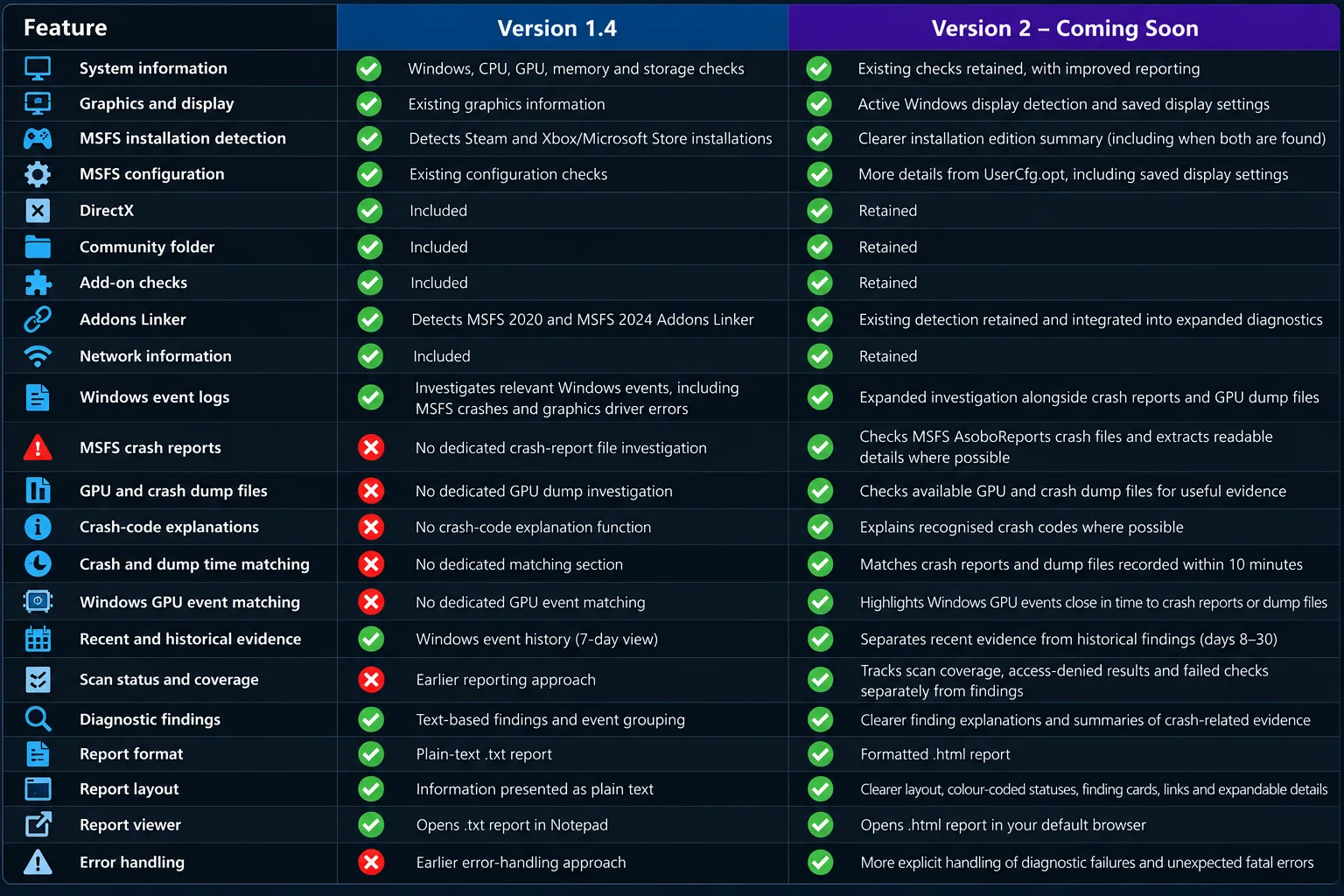
Here's a look at how Version 2 compares with the existing Version 1.4.

Feature

Version 1.4

Version 2 — Coming Soon

System information

Windows, CPU, GPU, memory and storage checks

Existing checks retained, with improved reporting

Graphics and display

Existing graphics information

Adds active Windows display detection and saved display settings

MSFS installation detection

Detects Steam and Xbox/Microsoft Store installations

Adds a clearer installation edition summary

MSFS configuration

Existing configuration checks

Adds more details from UserCfg.opt, including saved display settings

DirectX

Included

Retained

Community folder

Included

Retained

Addons Linker

Detects MSFS 2020 and MSFS 2024 Addons Linker

Existing detection retained and integrated into the expanded diagnostics

Network information

Included

Retained

Windows event logs

Investigates relevant Windows events, including MSFS crashes and graphics driver errors

Expanded investigation alongside crash reports and GPU dump files

MSFS crash reports

No dedicated crash-report file investigation section

New: Checks available MSFS AsoboReports crash files and extracts readable details where possible

GPU and crash dump files

No dedicated GPU dump investigation section

New: Checks available dump files for useful graphics or crash evidence

Crash-code explanations

No equivalent dedicated crash-code explanation function

New: Explains recognised crash codes where possible

Crash and dump time matching

No dedicated matching section

New: Matches crash reports and dump files recorded within 10 minutes of each other

Windows GPU event matching

Existing Windows event investigation

New: Highlights Windows GPU events close in time to crash reports or dump files

Recent and historical evidence

Existing Windows event history, including a 7-day view

Expanded: Separates recent evidence from historical crash and dump findings from days 8–30

Scan status and coverage

Earlier reporting approach

New: Tracks scan coverage, access-denied results and failed checks separately from findings

Diagnostic findings

Existing text-based findings and event grouping

Improved finding explanations and clearer summaries of crash-related evidence

Report format

Plain-text .txt report

New: Formatted .html report

Report layout

Information presented as plain text

Improved layout, colour-coded statuses, finding cards, links and expandable historical details

Error handling

Earlier error-handling approach

Adds more explicit handling of diagnostic failures and unexpected fatal errors

Overall aim

Collects system information and investigates relevant Windows events

Builds on the existing tool with more detailed crash investigation and easier-to-read reports

A new HTML/web report

One of the biggest changes is moving away from the plain text report used in Version 1.4 to a formatted HTML report in Version 2. The aim is to make the results easier to read and navigate, with information organised into clearer sections rather than having everything displayed as plain text.

I'm also working on making the results clearer when a check cannot run, as that doesn't automatically mean something is wrong with your PC or simulator.

What's staying the same?

The existing diagnostic checks aren't being thrown away. System information, DirectX, MSFS installation and configuration checks, Community folder and add-on checks, network information and Windows event investigation remain part of the tool.

The idea is to build on what is already there while adding more useful information and improving how the results are presented.

Still being worked on

Version 2 is not available to download yet. I'm still working on it, checking the new features and improving the results before release.

The new crash investigation and GPU dump checks need further testing on real systems. Timestamp matches can help identify related evidence, but they don't automatically prove what caused a crash.

Follow the project

You can find the current Diagnostics Tool information here: https://empirekicking.forumspark.net/pages/diagnostics_tool

Flightsim.to: https://flightsim.to/addon/114888/msfs2024-diagnostics-tool

I'll share more updates as development continues.

Version 2 is coming soon, more to follow! ✈️:fire::fire::fire::fire::fire::fire:

"Please remain seated. The captain has absolutely no idea what he’s doing."

"Please remain seated. The captain has absolutely no idea what he’s doing."

Board Statistics

121 Posts
73 Topics
13 Members
Banju Newest Member
276 Record Online